PitchAI Connectors

PitchAI Connectorsconnectors.pitchai.net

Connect everything. Never hand over a key.

Mail, calendars, files, WhatsApp, databases and your own computers, connected per account. Agents never see a password or token: every call is checked and logged.

Sources
12
Every connection starts
off
Switch on for
15 to 120 min
Sending
after approval
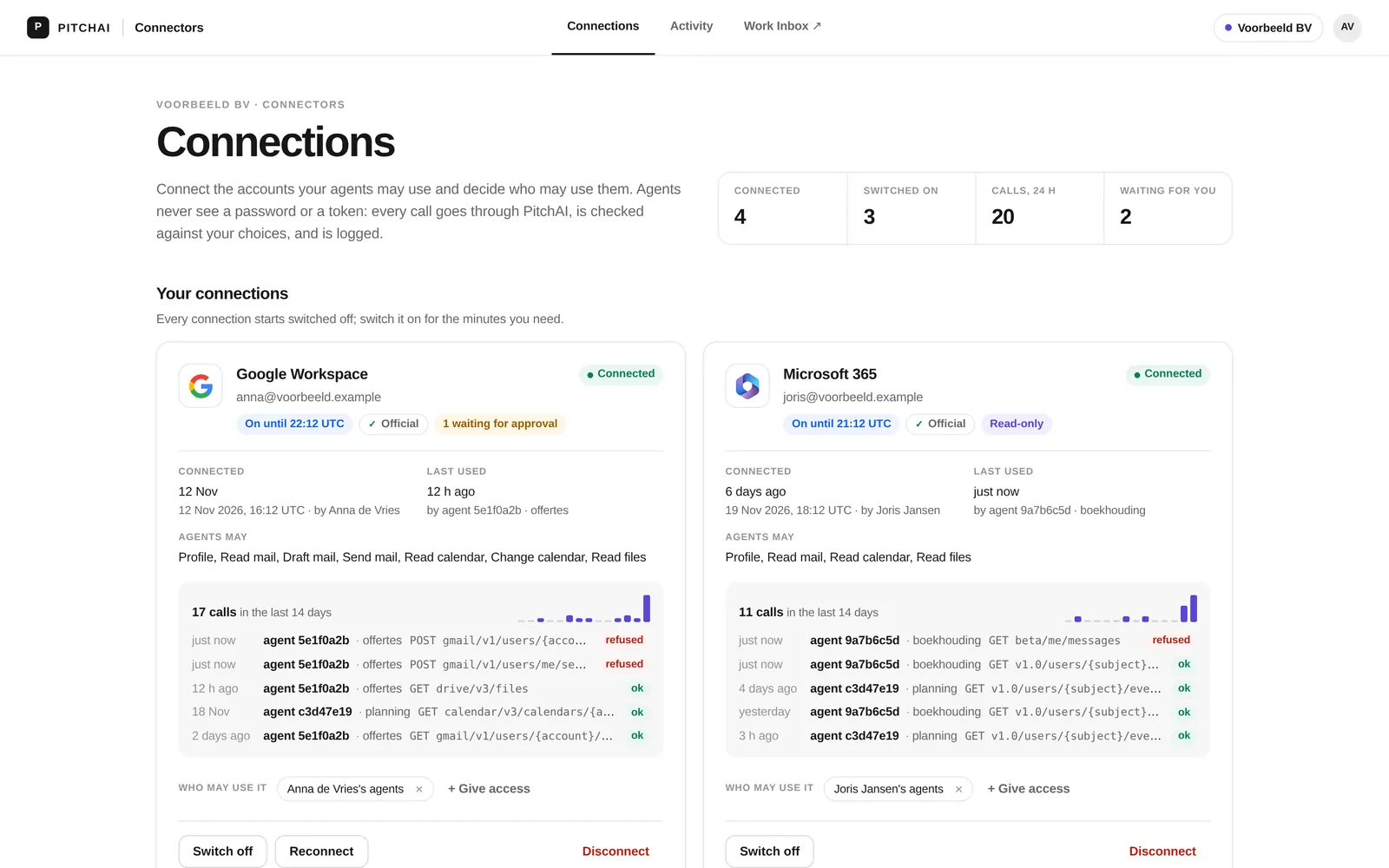
The Connections page: four connected accounts, three switched on, twenty calls in 24 hours and two waiting for approval.
Fig. 1 Connections: what is connected, what is on and what is waiting for you. Demo data.

01

Your accounts, your rules. Agents only do what you allow.

Connectors links the services your business already uses to your agents, per account and per person. You decide what an agent may do, when a connection is on and what needs your yes first.

01Overview

All your connections in one overview.

For each connection you see who made it, when it was last used, what agents may do and every call of the last fourteen days, allowed or refused.

  • Status, window and approvals at a glance
  • Calls per day and the latest calls per agent
  • Switch off, reconnect or disconnect with one click
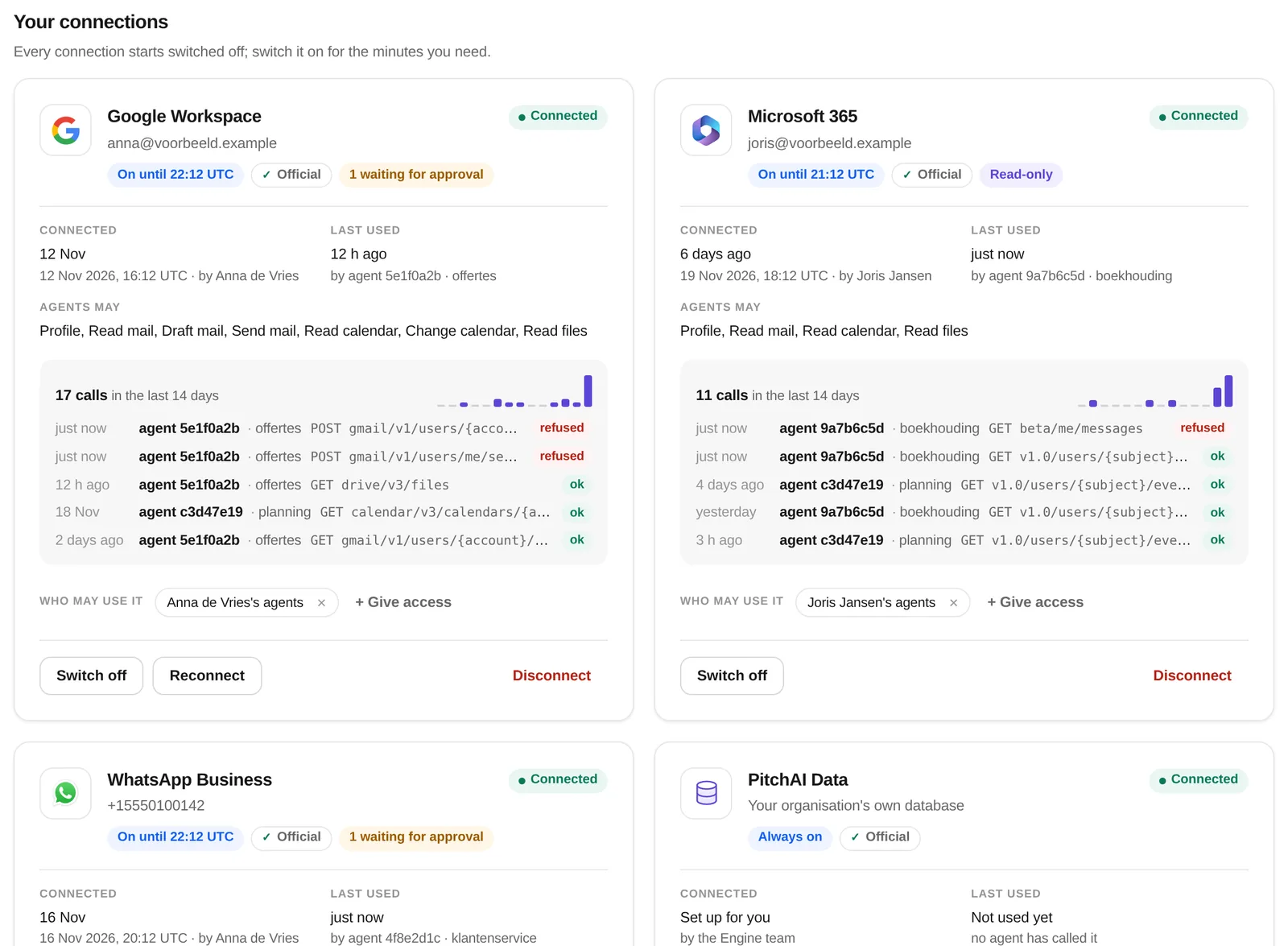
Cards for Google Workspace, Microsoft 365, WhatsApp Business and PitchAI Data, with status, permissions and calls.
Fig. 2 Connection cards with permissions, calls and buttons. Demo data.

02Approval

Nothing leaves without a yes.

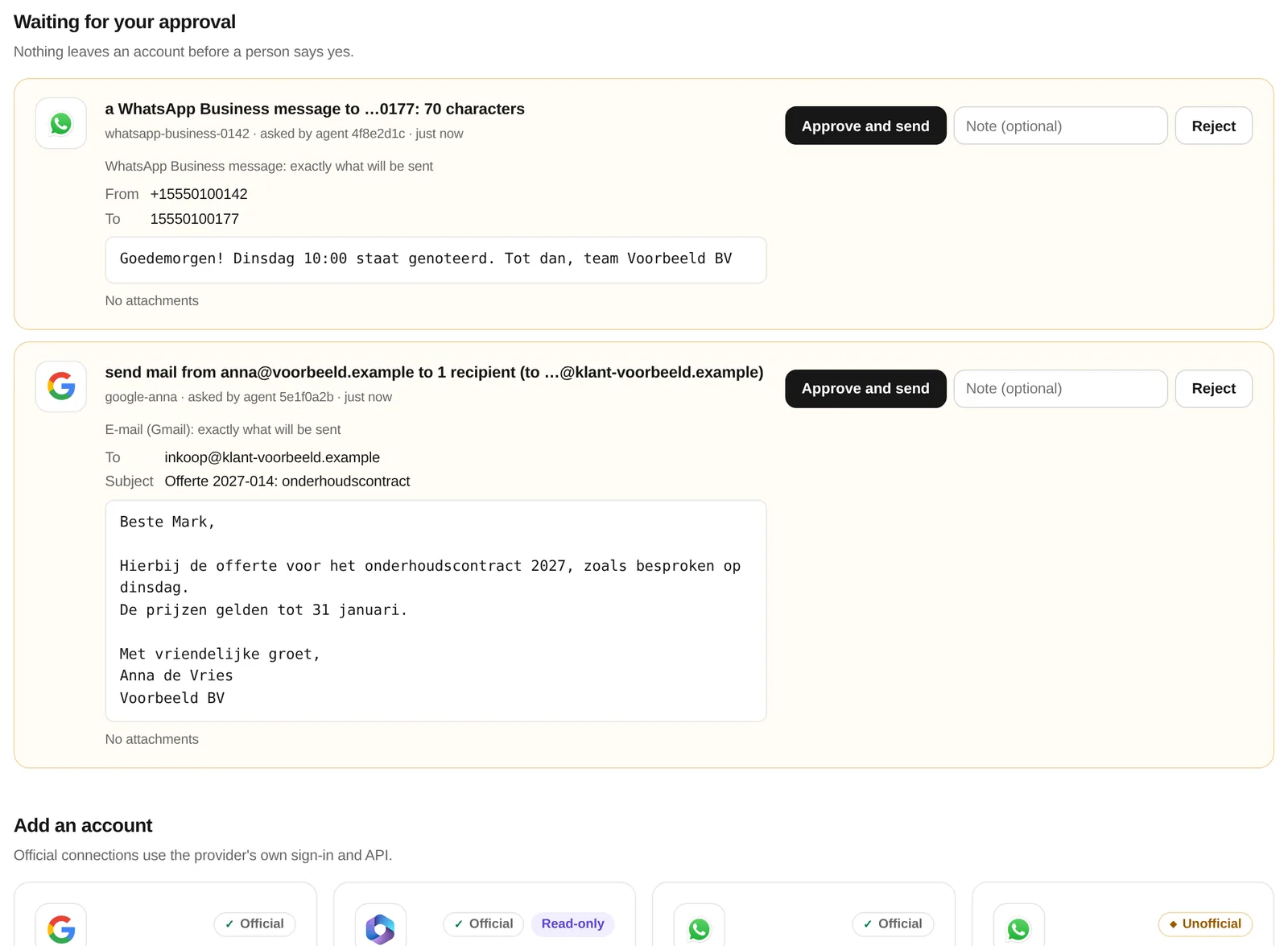
A mail or message an agent wants to send waits for the account's owner. You see exactly what will be sent, hidden characters made visible, and an approved message goes out at most once.

  • The exact text that will be sent, with recipient and attachments
  • Approve with a note, or reject
  • Kill switch, allowed recipients, 20 an hour and 100 a day
Two messages waiting for approval: a WhatsApp message and a quote email, each with the exact text.
Fig. 3 Waiting for approval: exactly what will be sent. Demo data.

03Sources

Twelve sources, one way of working.

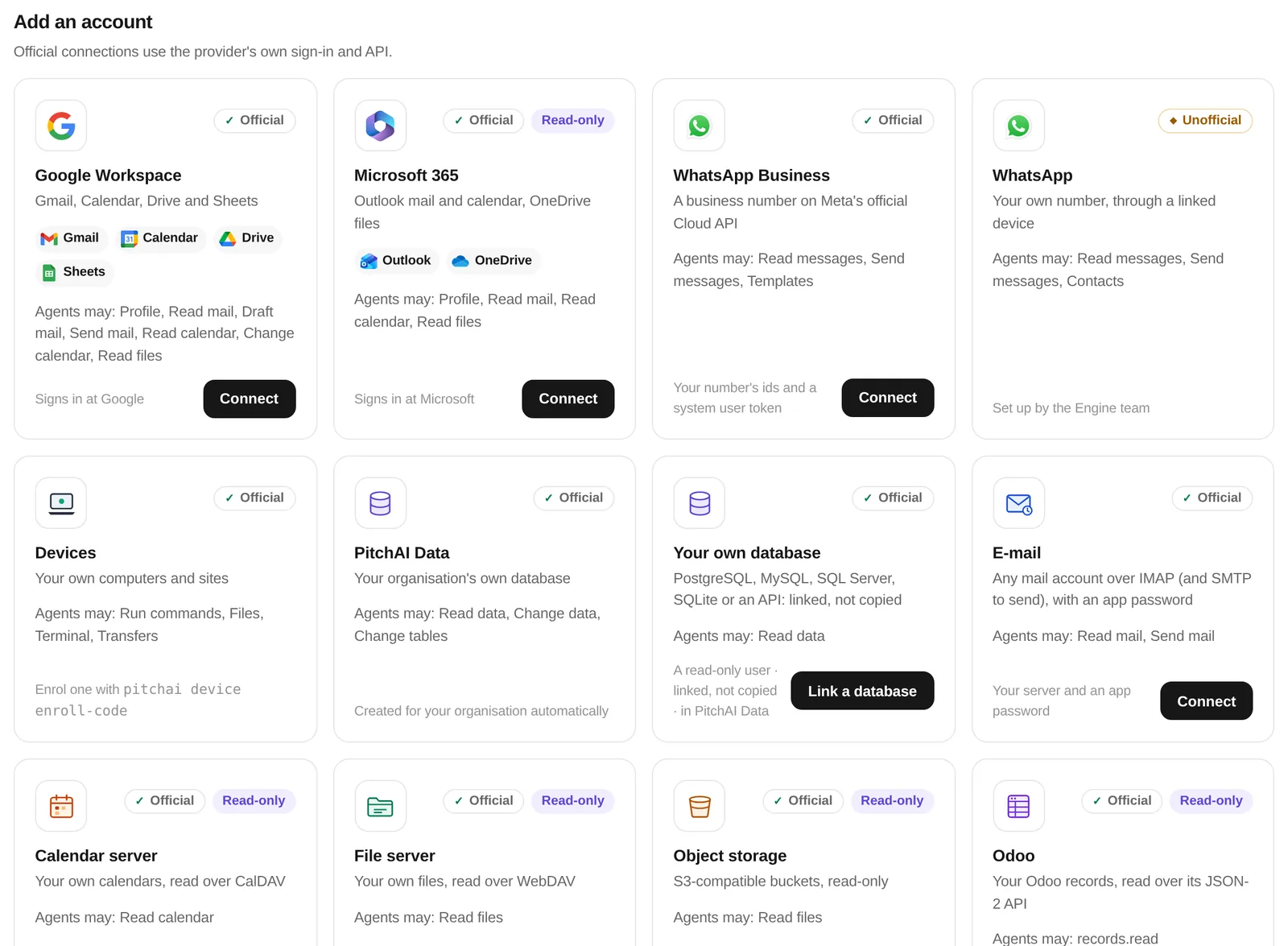
Google Workspace, Microsoft 365, WhatsApp Business and your own WhatsApp number, any mailbox, calendar and file servers, S3 storage, Odoo, PitchAI Data, your own database and your own devices. All through the same simple calls.

  • Official sign-in with Google and Microsoft
  • Microsoft 365 strictly read-only
  • Your own database linked live, never copied
The catalogue for adding an account, with official, read-only and unofficial sources.
Fig. 4 Adding an account: twelve sources. Demo data.

04Permissions

Exactly what an agent may do, per connection.

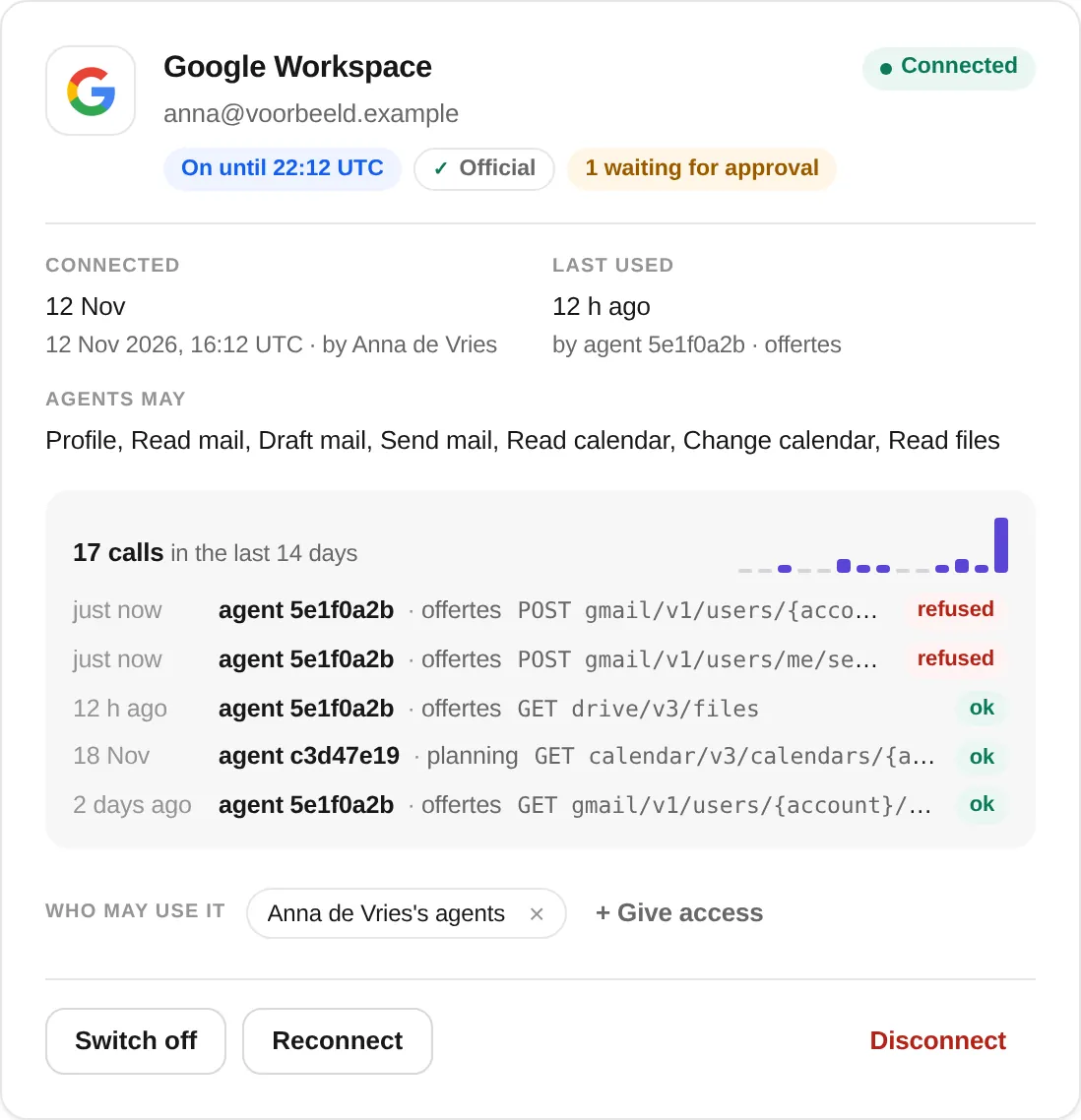
For each connection you choose the capabilities: profile, read mail, draft, send, calendar, files. Behind each capability sit only the allowed paths of the service, and only the account's own data.

  • Capabilities per connection, per person or for the organisation
  • Only allowed paths; everything else is refused
  • Access for someone's agents, one agent or a project
The Google Workspace card with what agents may do and the latest calls.
Fig. 5 What agents may do, per connection. Demo data.

05No keys

Agents never see a key.

An agent calls a local connection; PitchAI adds the token and checks every call. Each call carries its own proof, keys are encrypted per organisation and the database strictly separates organisations.

  • No password or token ever in an agent's hands
  • Encryption with a key per organisation
  • Clear outcomes: done, waiting for approval, reconnect, refused
Fig. 6 An agent calls a connection: reading is allowed, sending waits for approval.

06Activity

Every call logged, the refused ones too.

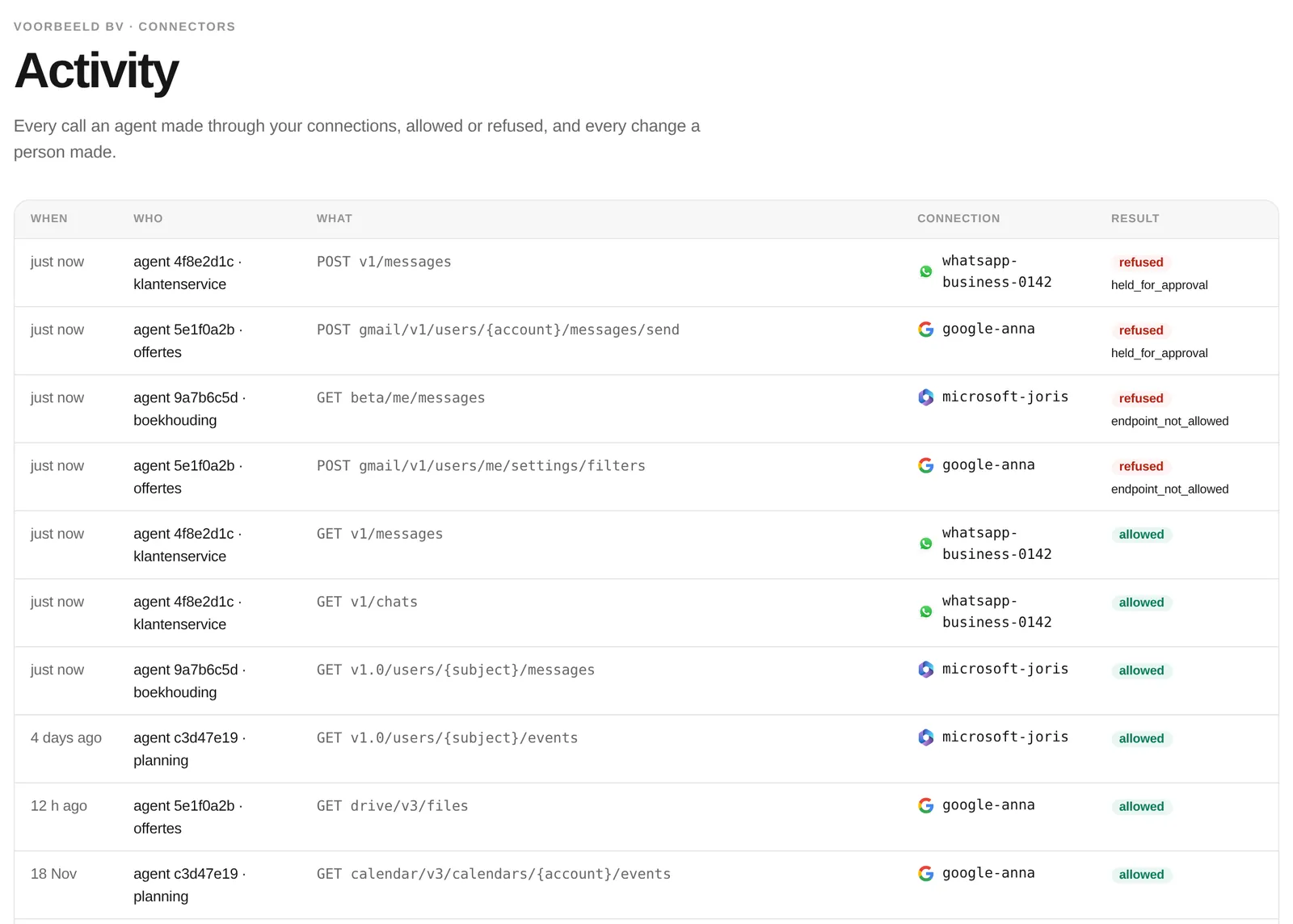
Activity shows every call by an agent, allowed or refused, and every change by a person. The log can only grow, and it keeps the SHA-256 fingerprint of every answer's exact bytes.

  • When, who, what, through which connection and with what result
  • Append only: the database refuses changes
  • A fingerprint of every answer
The activity table with allowed and refused calls per agent and connection.
Fig. 7 Activity: every call with its outcome. Demo data.

07WhatsApp

WhatsApp, business and personal.

Your business number through Meta's official Cloud API, or your own number as a linked device in its own isolated environment. Both through the same simple calls, and every send approved.

  • Messages, chats and media through one API
  • The 24-hour customer window enforced
  • Give access per person, agent or project
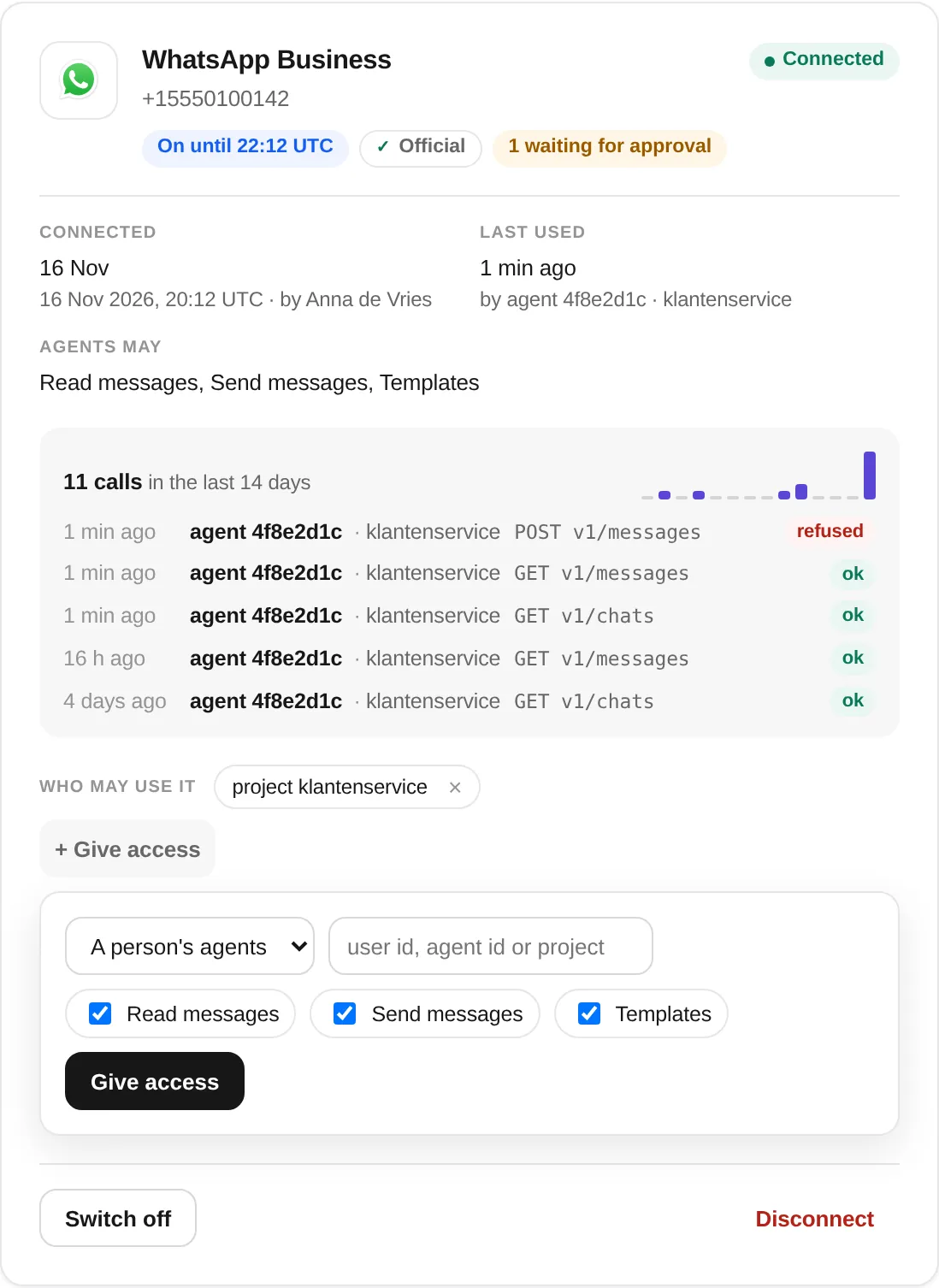
The WhatsApp Business card with status, permissions and calls.
Fig. 8 WhatsApp Business, with permissions and calls. Demo data.

08Devices

Your own computers, safely within reach.

Laptops, desktops and sites become devices on which agents run commands and move files of any size. A command runs under its own service account, and output is masked on the device itself.

  • Commands, an open shell and files both ways, resumable and verified
  • Wait until a device comes online
  • Access per device, a log and revocation
Fig. 9 Devices: commands and files on your own computers.

02

Everything Connectors does.

Sources

Google Workspace
Gmail, Calendar, Drive and Sheets.
Microsoft 365
Outlook, calendar and OneDrive, strictly read-only.
WhatsApp
Business through Meta, or your own number.
Mail and servers
Any mailbox over IMAP and SMTP, CalDAV, WebDAV, S3 and Odoo.
Databases
PitchAI Data and your own PostgreSQL, MySQL, SQL Server or SQLite.
Picked files
Share only the files you pick, not your whole Drive.
Mail in one click
Nine known providers ready, or any mail server of your own.
Chat export
Drop in an exported WhatsApp chat from Android or iPhone.

Control

Per person or organisation
Your own account, or one for everyone.
Off by default
Switch on for 15, 30, 60 or 120 minutes, or keep your own mailbox on.
Approval
Every send waits for the account's owner.
Limits
Kill switch, allowed recipients, 20 an hour and 100 a day.
Roles
Owner, operator and member.
Only you approve
On your own account you approve; others can only reject.
Valid for a day
A send nobody approves expires after 24 hours.

Security

No keys for agents
PitchAI adds tokens and checks every call.
Proof per call
Its own signature and a one-time proof with every call.
Encryption
A key per organisation.
Separation
The database strictly separates organisations.
Allowed paths
Only what belongs to a capability.
Nothing approved blind
Hidden characters shown; anything unreadable can only be rejected.
European hosting
On our own servers in Germany and Finland.
Isolated per number
Every own WhatsApp number in its own environment, with only the traffic it needs.
Verified publisher
PitchAI's Microsoft app carries Microsoft's blue verified badge.

Insight

Activity
Every call, allowed or refused.
Fingerprint
SHA-256 of every answer, with the access that allowed it.
Unchangeable
The log can only grow.
Calls per day
Per connection, fourteen days back.
Kept for a year
Activity for 365 days, then removed automatically.

For developers

Command line
List, details, calls and approvals.
Clear outcomes
Done, waiting, reconnect, refused, uncertain or later.
Status links
Apps follow a connection with their own status link.
Refresh and revoke
For apps and per grant.
Connect apps
An app sends someone over and gets read access to that one source.
Three languages
Connect screens in Dutch, English and Portuguese.

Devices

Commands
Run them, with an open shell too.
Files
Any size, resumable and verified.
Wait for online
A command waits until the device is there.
Own service account
Not as the person themselves.
Task recordings
Encrypted per organisation, with restore or delete.
Mac app
Status, access and activity in the menu bar, approve with Touch ID.

03

Connected in four steps.

  1. 01

    Connect an account

    With the official sign-in of Google, Microsoft or Meta. Your password never reaches us.

  2. 02

    Choose what is allowed

    Capabilities, allowed paths and who may use it.

  3. 03

    Switch on when needed

    For a window of minutes, or always for your own mailbox.

  4. 04

    Approve and follow

    Sends wait for your yes, and every call is in the activity.

04

Your agents at work, in the systems you already have.

A few examples of work agents do through Connectors.

Use caseCustomer service

Answer customer questions on WhatsApp Business.

Connection
WhatsApp Business
Agent may
Read messages and propose an answer
Result
An answer within the 24-hour window
Human
Approves and sends

Packages

Included in every package.

Connectors is part of PitchAI's Managed AI Service. Ready-made connections and the local connector are in every package; custom connections, built by PitchAI, from Silver.

  1. Bronze

    Ready-made connections and the local connector.

  2. Silver

    Plus four custom connections built by PitchAI.

  3. Gold

    Custom connections without a fixed limit.

Packages and prices on agents.pitchai.net

06

What people ask us.

Which services can we connect?

Google Workspace (Gmail, Calendar, Drive, Sheets), Microsoft 365 (Outlook, calendar, OneDrive), WhatsApp Business and your own WhatsApp number, any mailbox over IMAP and SMTP, CalDAV calendars, WebDAV files, S3 storage, Odoo, PitchAI Data, your own database and your own devices.

Do agents get our passwords or tokens?

Never. An agent calls a local connection; PitchAI adds the token, checks the call against your choices and logs it.

Can an agent just send mail or messages?

No. Every send waits for the account's owner, with the exact text in view. On top of that there is a kill switch, a list of allowed recipients and a limit of 20 an hour and 100 a day.

How long is a connection on?

Every connection starts off. You switch it on for 15, 30, 60 or 120 minutes, or keep your own mailbox always on.

What can we see afterwards?

Activity shows every call, allowed or refused, with the answer's fingerprint. The log can only grow; the database refuses changes.

Can we connect our own computers too?

Yes. Laptops, desktops and sites become devices on which agents run commands and move files, with access per device and a complete log.

What does it cost?

Ready-made connections and the local connector are in every Managed AI Service package; custom connections from Silver. See the packages on agents.pitchai.net.

07

Connect your first account.

Tell us which systems your team uses every day. We will show you how your agents work with them, without ever seeing a key.

Email us info@pitchai.net
Address
Tervuursestraat 159, 3000 Leuven, Belgium
Company
PitchAI CommV · RPR Leuven
VAT
BE1016.077.077